How to Run Claude Code and Codex Together on One Repo
A practical workflow for running Claude Code and Codex on the same repo without colliding edits. Learn when to hand off, when to run in parallel, and how HackUtilities keeps both sessions visible.
Martijn Smit 7 min read
How to run Claude Code and Codex together on one repo
You’ve got one repo open, tests running locally, and two jobs for the next hour. You can run Claude Code and Codex together, with Claude mapping the refactor while Codex handles a narrow fix. Before sending either prompt, decide who owns which files and when one agent must wait for the other.
You can run both from the same project root as separate sessions. Use sequential handoffs when their work overlaps, and parallel assignments only when the file boundaries are clear. Neither session’s chat history should stand in for instructions the other agent needs.
What does “together” actually mean on one repo?
Choose either a sequential handoff or parallel work on independent areas. If both prompts authorize changes to the same files, pause one of them.
In a sequential handoff, one agent finishes a bounded task before the other starts. Claude might write a refactor plan without changing application code; you review it, then give Codex one approved change to implement. Use this when the second task depends on decisions from the first, or both would touch the same files.
In parallel independent work, both agents run at once with boundaries you can name before they start. One owns documentation while the other fixes an isolated parser. Include files they might change along the way: shared configuration or generated output can turn apparently separate tasks into overlapping work.
The unsafe third pattern is concurrent editing of the same area. If one agent refactors a module while the other fixes its behavior, each can act on code the other is still changing. A clean-looking final diff does not establish that either agent’s assumptions survived.
Record ownership in a short task file, including where each agent must stop and ask before expanding scope. That gives you a boundary to enforce when a small fix starts growing.
How do I launch Claude Code and Codex from the same project root?
In HackUtilities, first choose Sidebar → Projects → Add Project and select the repo folder. Then open Projects → and choose Claude Code or Codex; repeat for the other tool. Both start in the project root, with separate terminals and activity states.
Install and authenticate both CLIs first. HackUtilities runs your installed tools with your own login and subscription. It does not install them or proxy their traffic.
- Open Projects → for the repo.
- Click + ADD PROCESS, then under Agent, choose Claude Code. The CLI launches in the project root and its terminal takes focus.
- Return to the project overview and repeat + ADD PROCESS → Agent → Codex.
Adding a session starts your login shell and launches the configured CLI with its default arguments. You do not need to type claude or codex yourself. Opening the second session does not replace the first terminal, but both still use the same working directory.
If a tool shows Missing, its CLI was not found and cannot launch from this menu. Install it yourself, then probe it again in Agent Tools…, available from the project’s actions menu.
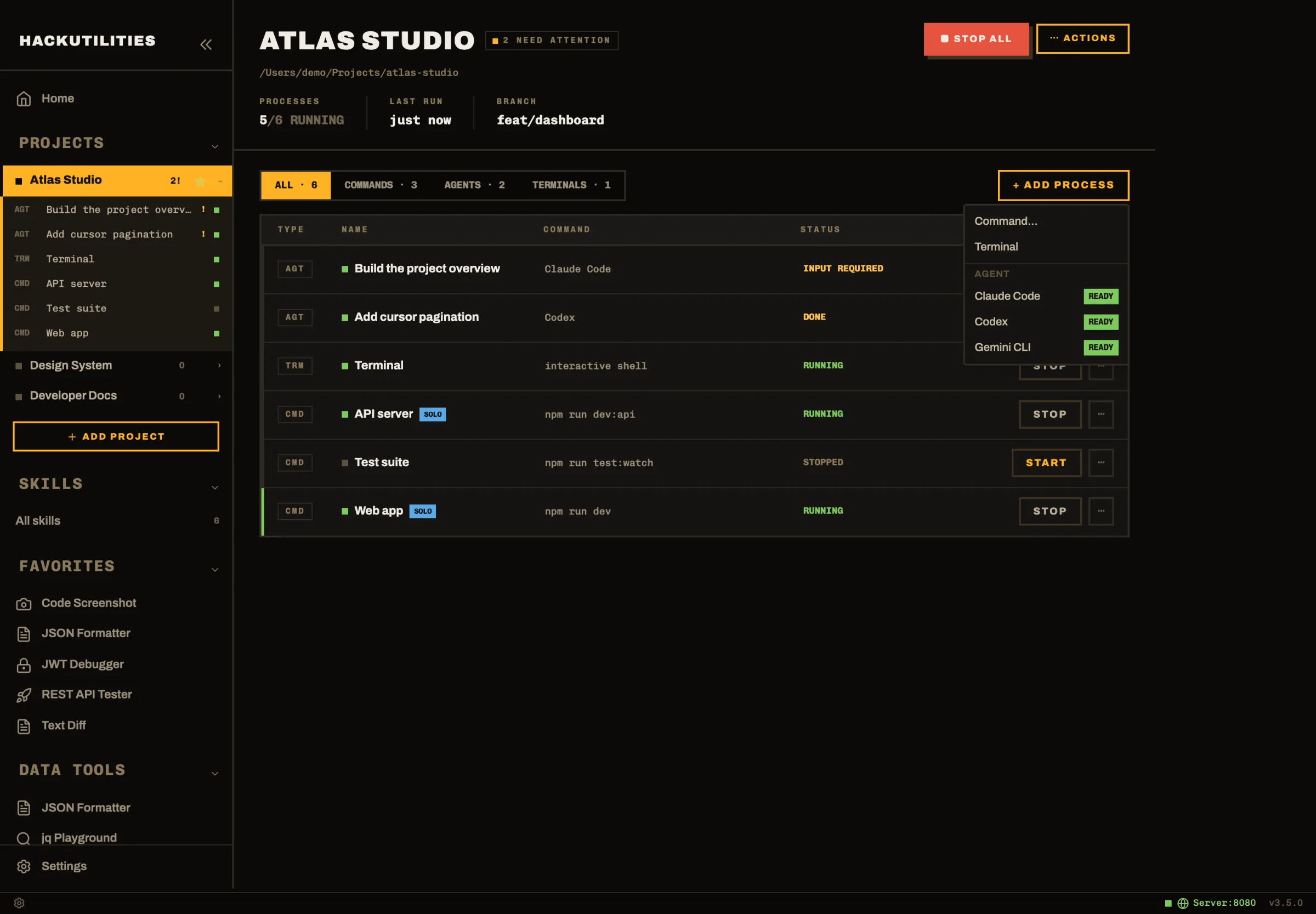
Starting the project leaves agents stopped; adding a new agent session launches it. After an app restart, returning sessions appear as stopped rows with a Launch button.
Which tool should write first, and what do I hand off?
Start with whichever tool has a bounded job you can define now, then pass a short Markdown task file to the next agent. I’d choose the order around the work rather than make either tool the permanent planner.
For a pagination refactor, ask Claude Code to identify callers that depend on offset pagination and write migration notes without implementing changes. Codex can then take one approved slice, such as adding cursor handling to a single endpoint. Review notes from a completed refactor can also define a narrow follow-up fix.
Reverse the order when a small defect blocks broader work. Give Codex a parser bug with a known failing input and ask it to keep the fix local. Once that change is ready, Claude can review whether other callers rely on the old behavior. Keeping the parser fix separate gives you a smaller diff to review before changing callers.
Keep the handoff in a file such as agent-task.md. Record the expected behavior, files in scope, constraints such as preserving the public function signature, and the relevant test command. Include regression cases that must pass.
Before handing over, update the file with what changed and what remains unresolved. Tell the receiving agent to read it first and report any mismatch with the current code before editing. Do not expect it to reconstruct the assignment from the other session’s conversation.
Why start the project without starting the agents?
Starting the project first lets you run dev servers and watchers while reproducing a bug yourself, before deciding what to delegate. Settle the scope, then launch the session you need.
Once work starts, visibility differs between the tools. HackUtilities reads Claude Code’s session files to distinguish Working, Permission required, Input required, and Done. Claude’s transcript also supplies a live task title, such as “Add cursor pagination”. On Windows, or when an older Claude version has no matching session file, detection falls back to heuristics.
Codex keeps numbered session names. Its activity state is inferred conservatively from permission-dialog markers, working banners, and your input; ordinary output alone does not change it. Treat the badge as a cue to inspect the terminal, not proof that the task passed its checks.
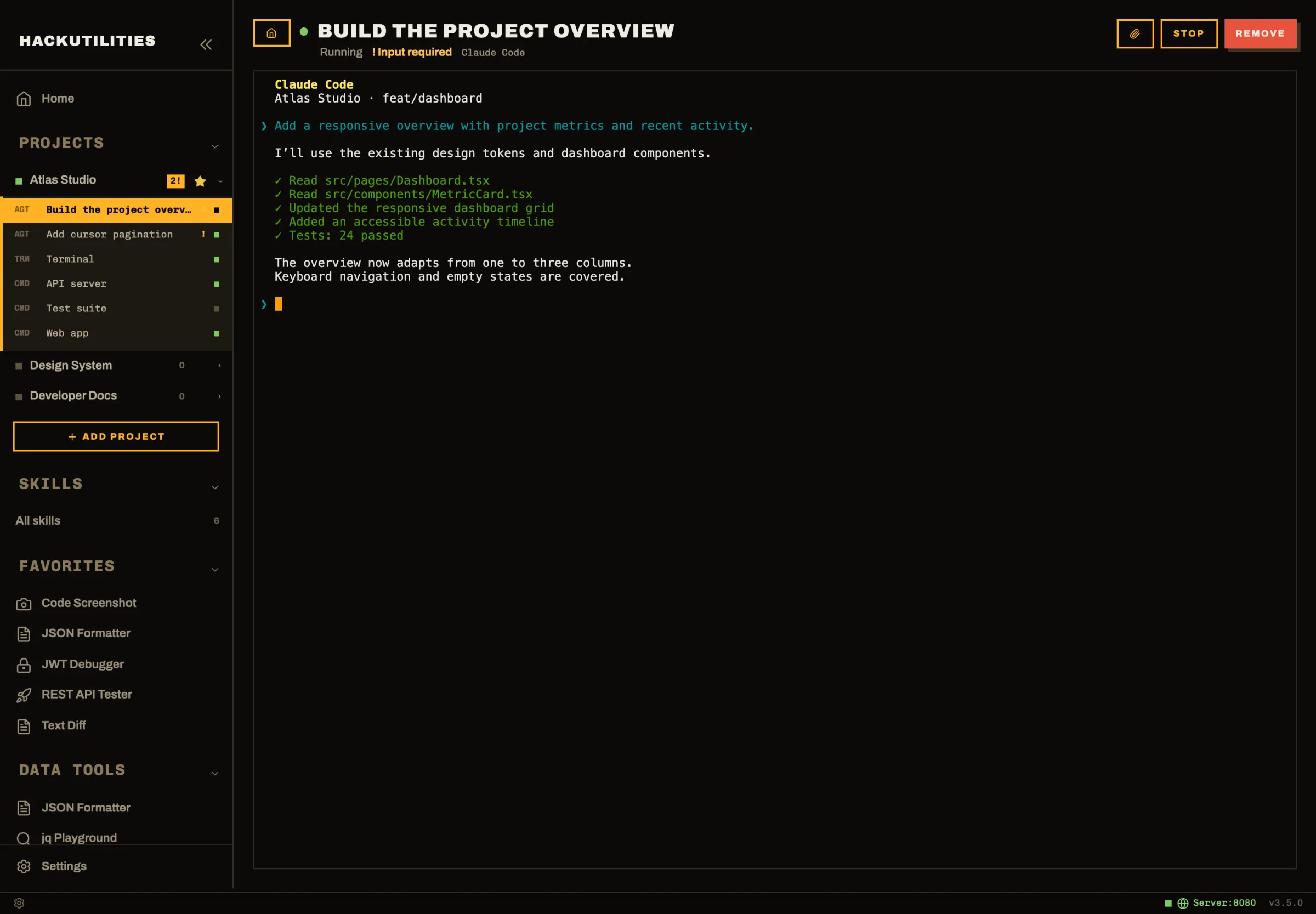
When HackUtilities is unfocused, a new transition into permission required, input required, or done triggers an OS notification. Clicking it opens that session. The Dock badge on macOS counts live agents needing attention; Windows has no taskbar badge.
How do I keep Claude and Codex out of the same files?
Assign one owner per file area. When simultaneous tasks need to write to overlapping areas, isolate them in separate Git working directories before launching the work.
Separate branches alone do not isolate two terminals in the same checkout: both share its files and current branch. Do not switch branches underneath a running agent and assume each session retains its own view. Use separate clones or Git worktrees, each on its own branch. A worktree provides another working directory for the same repository.
Set that up with Git first. The same-project launch path above puts both agents in one root; separate terminal rows do not create separate checkouts. HackUtilities does not create or manage branches or worktrees for you.
In a shared root, stop an agent when its fix requires a file owned by the other session. Reassign ownership before it continues. If this keeps happening, the tasks are coupled enough to run sequentially.
Do not ask the second agent to “finish up” the first agent’s unreviewed diff. Stop the original writer, inspect its changes, and accept them into a known commit or merge the reviewed branch before authorizing further edits. Otherwise, later corrections can obscure which change introduced a regression.
What should I check before I accept the handoff?
Accept the handoff only when the actual changes, test results, and task file agree. An agent’s completion message tells you where to start looking.
- Inspect the full change set. Check
git statusfor untracked files as well as reviewing the diff. Look for unrelated formatting, dependency changes, or deleted assertions that make tests easier to pass. For a parser fix, trace the failing input through the changed code rather than judging only the new test. - Run the relevant checks yourself. Execute the test command in the task file and check affected callers. Distinguish a passing run from a test the agent could not execute because a dependency or service was unavailable. Record that gap explicitly: “tests added” does not mean “tests passed.”
- Compare the implementation with the handoff file. Check the expected behavior and constraints against the code. If the implementation deliberately differs, resolve that decision and update the file before the next agent inherits contradictory instructions.
Then give the second agent a review-only assignment. Identify the commit or diff to inspect and request findings tied to files and behavior, without authorizing fixes. The reviewer needs the actual patch, not just the first agent’s account of it.
While review runs, HackUtilities’ command palette groups sessions needing you under Needs Attention. Open the relevant session and read its findings. Try to reproduce a reported problem before requesting a fix; a finding you cannot reproduce needs investigation.
Within the next 24 hours, try one small bug fix with a task file and a separate review session. You should be able to account for every changed file and every unverified check without reconstructing a chat history.
Take the product tour or try HackUtilities free for 14 days, with no card and no account.