Run Multiple Claude Code Sessions Without Losing Track
This guide shows a repeatable 3-session workflow for one repo: bugfix, refactor, and tests. It also gives a clear rule for when to stay in one checkout and when to split environments.
Martijn Smit 7 min read
Short version: yes, I run multiple Claude Code sessions on one repo. What usually falls apart is tracking them: a few identical terminal tabs, one permission prompt hidden in the background, and no quick way to tell which session owns the bugfix versus the tests.
The setup that works is simpler than it sounds: one repo, one Claude session per task, one place to supervise them. In HackUtilities’ project view, you can run multiple Claude Code sessions in the same project, and each one gets its own terminal and activity state.
This only works when the tasks can safely share one checkout and local runtime state.
Opening more terminals is not the same as running parallel Claude work
Real parallel Claude work starts when each session has a clear owner and a clear boundary. One session owns the checkout bug, one owns the refactor, one owns the regression tests. That keeps prompts, approvals, and output attached to one line of work instead of mixed together in shell history.
The time sink is usually not launching extra sessions. It is checking on them. With plain terminals, you keep reopening tabs to answer the same questions: what is this one doing, does it need me, and is it actually finished? For Claude Code, HackUtilities usually reads Claude’s own session state instead of guessing from terminal output, so it can tell Working, Input required, Permission required, and Done apart more reliably. On Windows, or with older Claude Code versions where no session file matches, it falls back to heuristics instead.
That changes how you supervise the repo. Instead of polling terminals in round-robin order, you keep one project open and let the task name and activity state tell you where to jump next.
Launch three Claude sessions in one project
The repeatable setup is short: add the repo as a project once, then launch Claude Code once per task from that project.
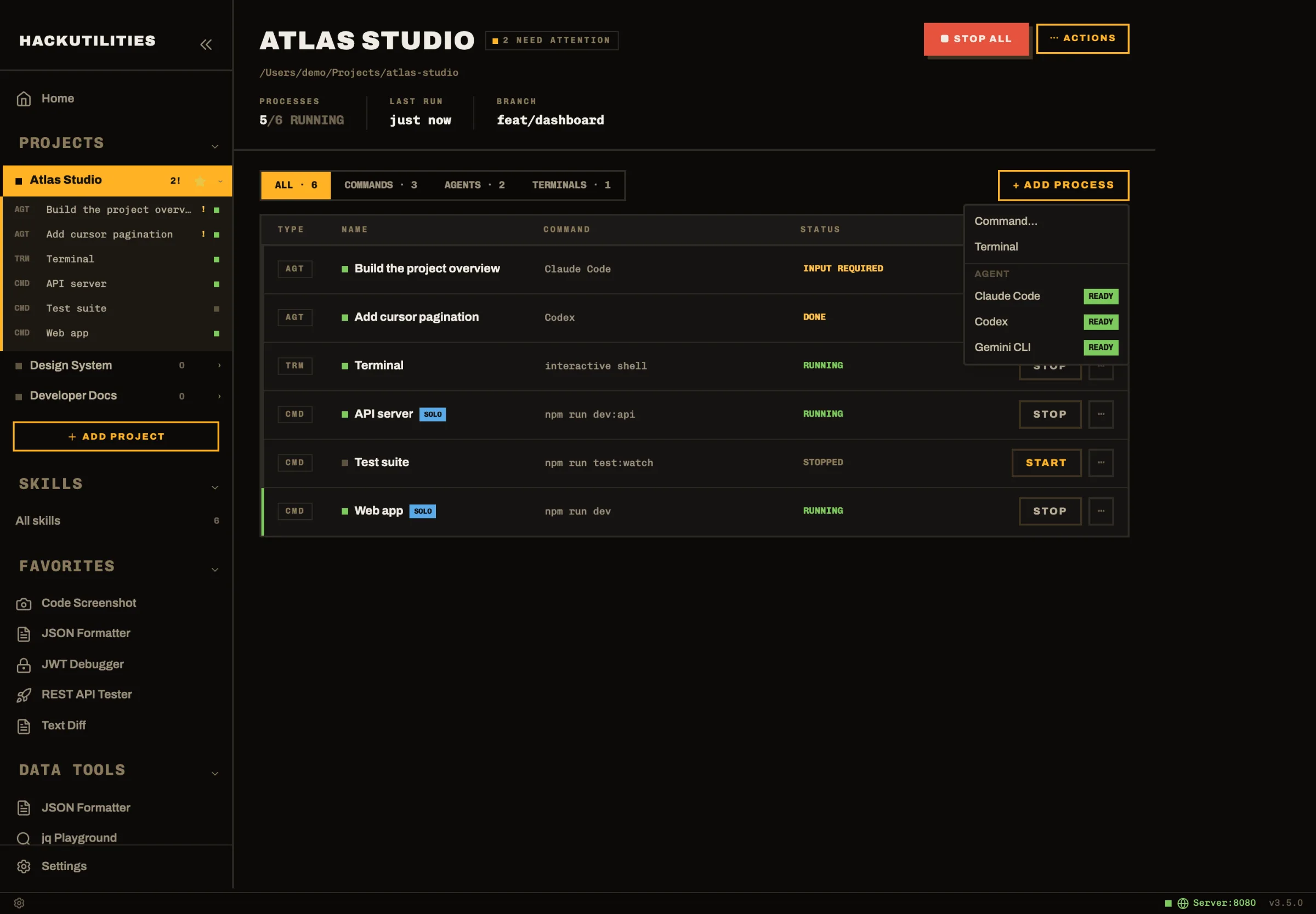
- From a fresh workspace, go to Sidebar → Projects → Add Project and register your local repo.
- Open Projects → to land on the overview page.
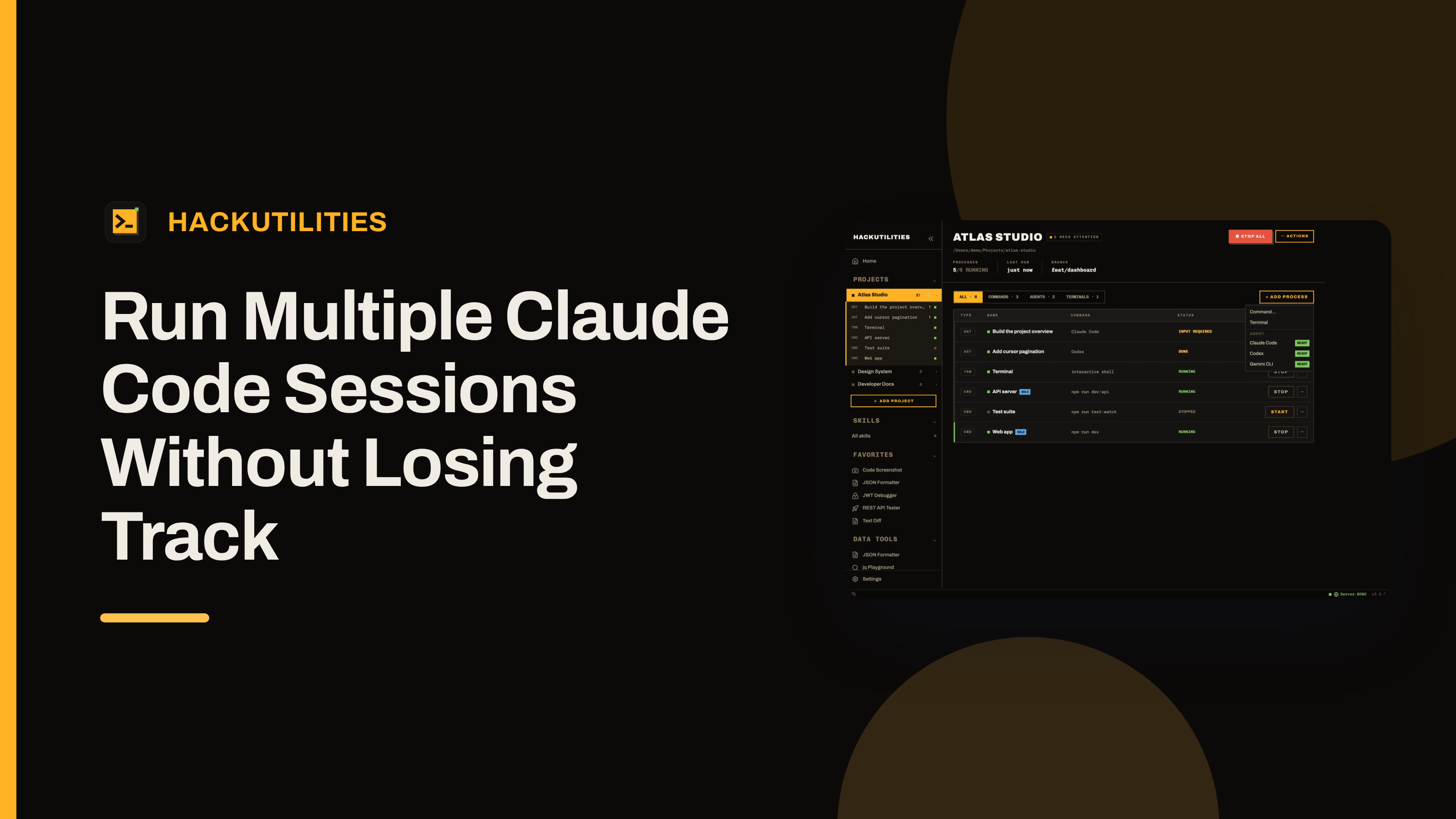
- Click + ADD PROCESS → Agent → Claude Code.
- Repeat + ADD PROCESS → Agent → Claude Code two more times.
- Use the first prompt in each new session to lock the task boundary early: one for the bugfix, one for the refactor, one for the tests.
Each launch opens a separate session in its own terminal, starts your login shell in the project root, and launches the configured Claude CLI for you. You do not type claude yourself.
After that, the project overview shows one row per command, agent, and terminal.
One boundary is worth stating plainly: HackUtilities launches the Claude CLI you already installed, with your own login and your own subscription. Nothing is proxied, and HackUtilities does not handle Claude billing. If the CLI is missing, it cannot launch it for you. Install and sign in to Claude Code first, then start the session from the project.
Let the task name become the thing you switch by
Once Claude has enough context to title a session, the generic label stops being the useful one. In HackUtilities, Claude Code sessions are named after what the agent is working on, so the row becomes the checkout bug, the refactor, or the test pass instead of another “Claude Code 2”.
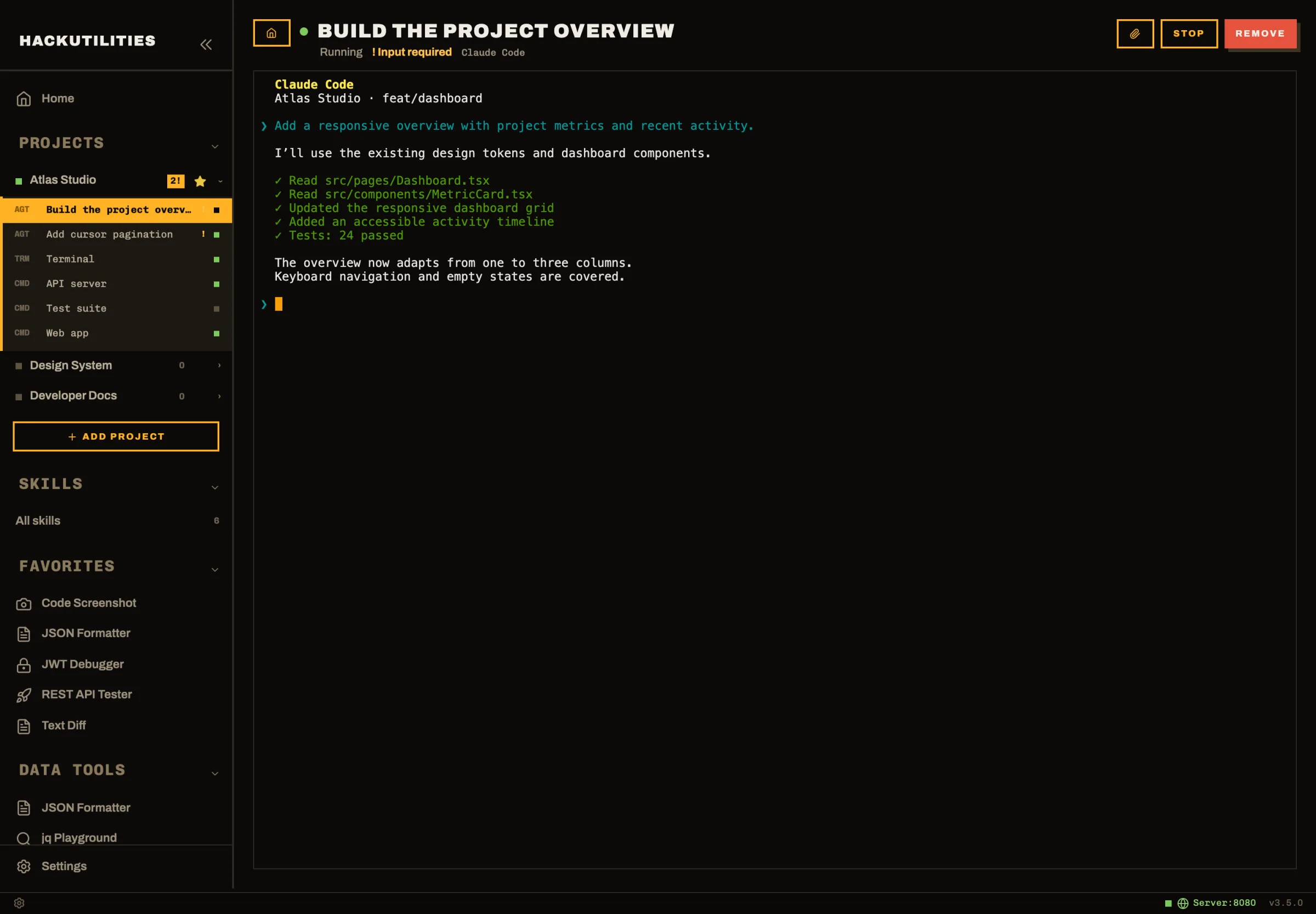
That title shows up in the places you already use to navigate: the sidebar, the process table, the session header, the command palette, and notifications. If a session pauses for approval in the background, the notification uses the task title too, so you see the actual work item instead of a numbered agent row.
Two details make this less jumpy than it sounds. The original row name stays as secondary context, which helps when you launched several sessions back to back, and row ordering does not change when the task title updates. Your project stays in the same visual order even as Claude gets more specific about what each session is doing.
In practice, this is the difference between switching by memory and switching by intent. Hit ⌘K / Ctrl+K, type part of the task name, and open the session you want.
Switch by attention state, not by tab-hopping
Once several sessions are running, the faster habit is to stop checking each one by hand. The useful distinction is what needs your attention now: leave Working alone, answer Input required, approve Permission required, and treat Done as a handoff point.
HackUtilities surfaces that in a few places. At the project level, the overview badge changes to N NEED ATTENTION. Inside the project, waiting sessions are marked in their rows and session headers. In the command palette, there is a Needs Attention group so you can jump straight to the blocked run.
If HackUtilities is in the background and a Claude session moves into Permission required, Input required, or Done, you get an OS notification. Clicking it focuses the app and opens that exact session. On macOS, the Dock badge counts how many live agents need attention.
This also makes switching safer. Each process keeps an output buffer that is replayed when you reopen its view, so moving between the bugfix, refactor, and test sessions does not lose the earlier terminal history while the app stays open. Once you view a Done session, its state flips back to Idle, which helps keep the attention list honest.
Pick the right isolation level before you start
A shared project is a good fit only when the tasks can safely share the same checkout and local state. If that is not true, split the environment first and only then launch another Claude session.
My rule is simple:
- Stay in one project when the tasks are separate in practice: different modules, different screens, different test areas, and no shared config or generated output.
- Use separate branches or worktrees when two sessions may touch the same files, do broad renames, update lockfiles, change build settings, or rewrite the same generated artifacts.
- Use separate containers or machines when runtime state can collide: different env vars, different dependency versions, a local database migration, a file lock, or two runs fighting over the same dev service.
The collision cases are usually boring. One session edits .env or another repo-level config file, another restarts the app and picks up those new values. One session rewrites generated output while another reads it halfway through. One changes a service the other assumed was stable. That is how “parallel” work turns into cleanup work.
Inside HackUtilities, the repo view is shared. The project overview shows the current BRANCH when the folder is a git repo, which helps you notice that all the agent rows in that project are working against the same checkout. What the app separates is the supervision layer around those runs: each Claude session gets its own terminal and activity state, and you can filter the process table down to AGENTS when you want only the active Claude work.
Another boundary matters if you use more than one Claude identity. HackUtilities supervises sessions, but it does not create branches, manage worktrees, build containers, or place agents on remote machines for you. It launches the CLI already installed on your machine, with your own login and subscription, so separate Claude accounts are something you plan outside the app.
Be honest about restart and recovery
If you quit HackUtilities, everything it started stops too. That includes Claude sessions, terminals, and project commands. The upside is that nothing keeps running behind your back as an orphaned process.
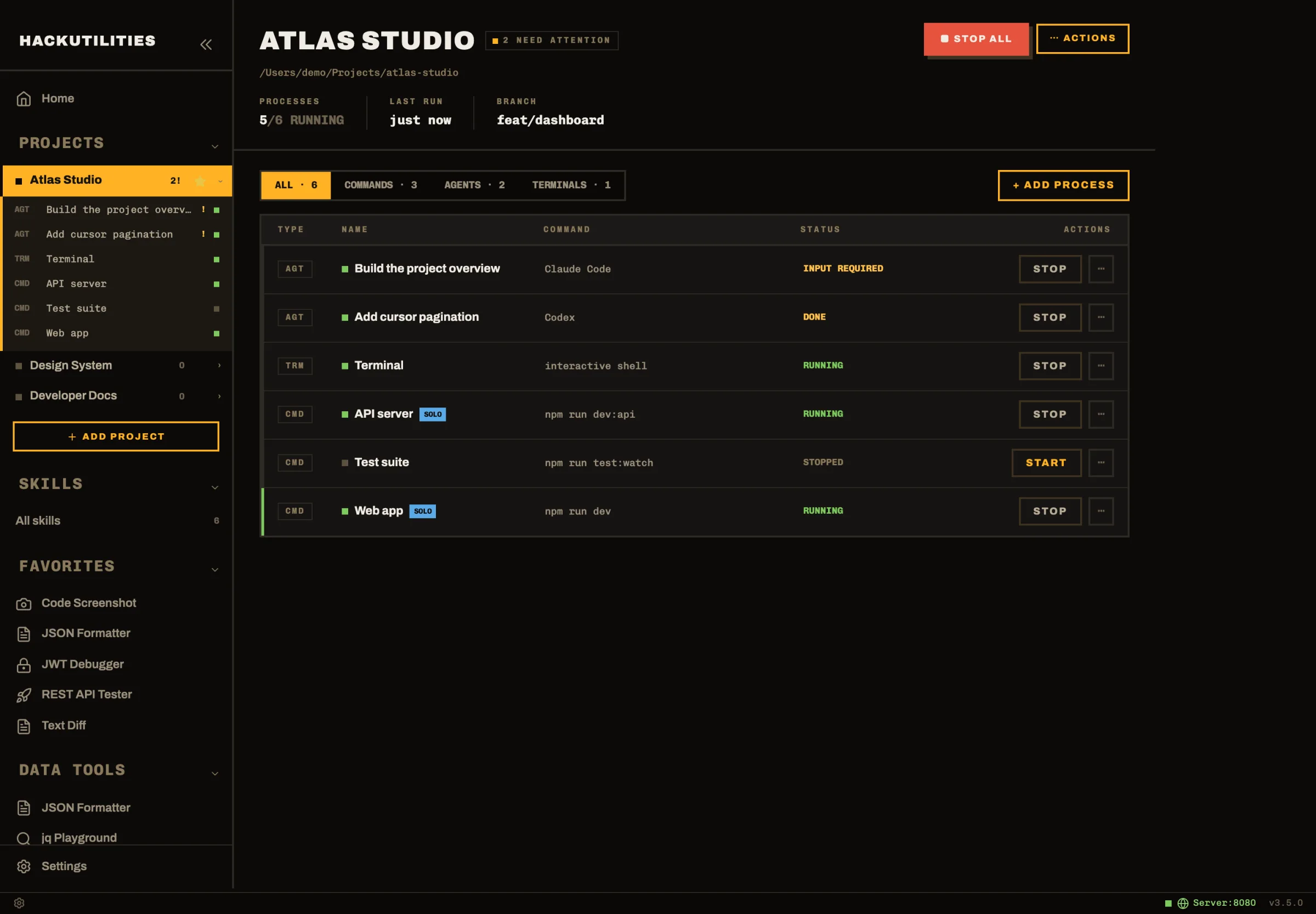
When you open the app again, the session rows come back as stopped rows with Launch buttons in the project overview. What you do not get is a live Claude session quietly continuing where it left off. If the Claude CLI exited, that session is over.
Recovery is deliberate. Starting the project again leaves agent rows stopped, so there is no blanket “start everything and resume all Claude work” step. Prior output is also not kept across app restarts. The output buffer helps while the app stays open, not after you quit and relaunch it.
The practical habit is straightforward: keep long-running Claude work open if you care about its live state or terminal history, and treat quit as teardown. If you do need to come back later, the stopped row and task title are your map. Relaunch the bugfix, relaunch the refactor, relaunch the tests, and re-establish context on purpose.
If you want to try this on a real repo, start small: one bugfix, one refactor, one test task. That is enough to tell you whether one shared project view stays calm for that codebase, or whether the next run should start with a worktree split.
HackUtilities has a 14-day free trial with no card and no account. Add one repo, launch three Claude sessions, and see if switching by task title and attention state feels better than tab-hunting. If you hit an ugly edge case, let me know. I’d love your feedback.